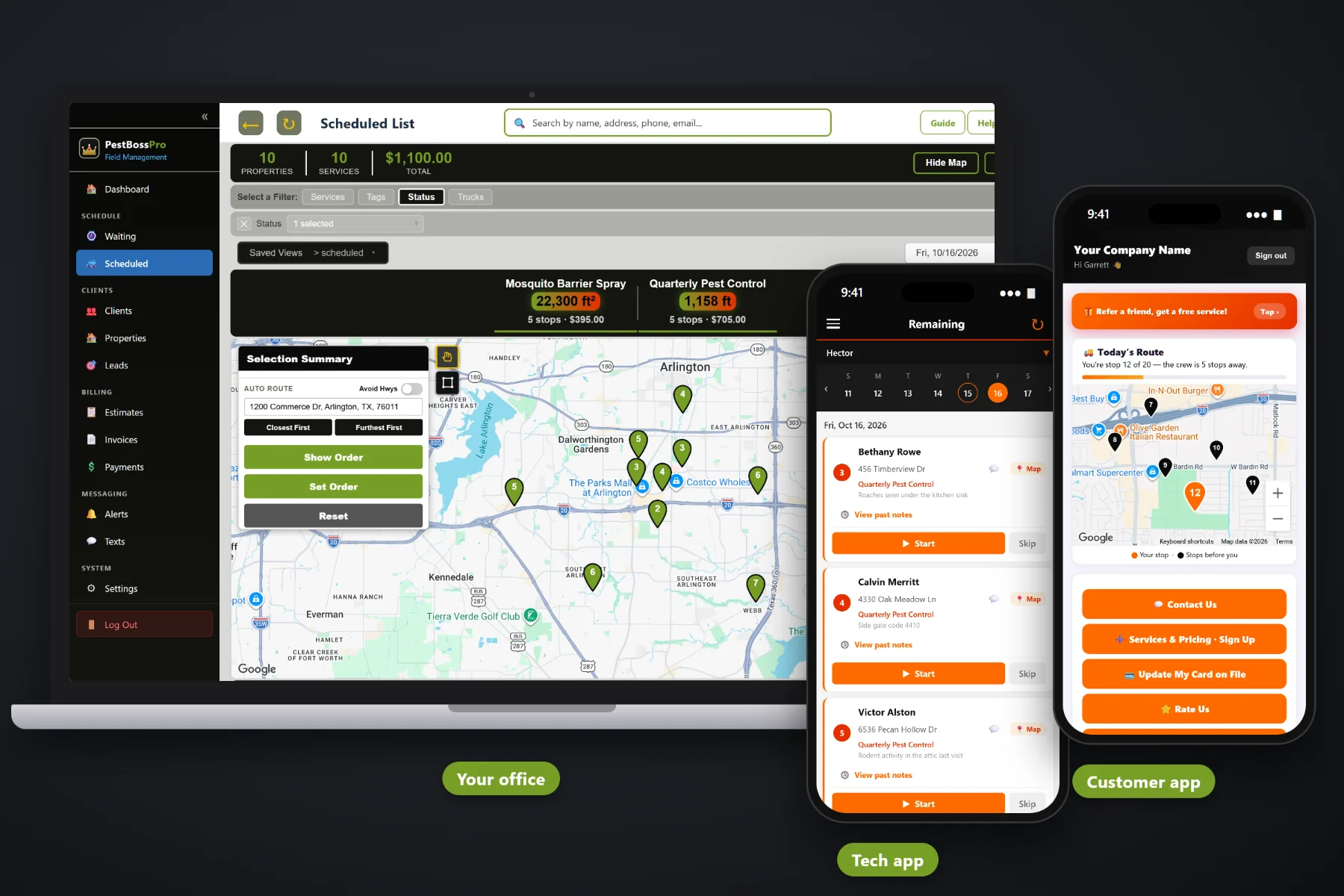
A pest control schedule is a moving target: quarterly homes coming due every week, a mosquito program that runs all summer, restaurants that need a monthly visit on the same day, and a call-back that has to squeeze in somewhere. PestBossPro puts every account that has come due on the Waiting List map, lets you circle an area to build a route, lays the day out on a dispatch board by truck, auto-routes Closest First or Furthest First from the shop, and sends the same order to each tech's phone.
Plans start at $59/month, and scheduling and routing are part of every plan. The Waiting List map, dispatch board, auto-routing, saved views, route sheets and customer texts come with the platform, not as an add-on. For the full picture of how scheduling fits with chemical records, the tech app, quotes and billing, start at PestBossPro and then dig into routes and dispatch here.
Every quarterly, bi-monthly and monthly account that has come due shows as a pin, colored by whether it is not due yet, due now or overdue.
Draw around a neighborhood on the map and schedule every due account inside it to a truck and a day.
The Scheduled List shows each day's jobs, and a truck filter shows one route at a time.
Closest First or Furthest First puts the day in a sensible order, and you can still set the order by hand.
On-the-way and arrived texts go out as the tech works the route, and the customer app shows their place in line.
Save the way you like to look at the schedule, and print route sheets when a paper copy helps.
Each recurring account is set by minimum days between visits: 90 for quarterly, 60 for bi-monthly, 30 for monthly. When an account comes due, it lands on the Waiting List map and list on its own. Nobody has to remember that the Hendersons were last sprayed in July. You look at the map, see the cluster of due pins on the north side, circle it, and that becomes Tuesday's route.
Most small pest companies build the schedule at the kitchen table after the trucks come in. PestBossPro turns that into a short routine: look at what is due, circle it, assign it, put it in order. The order you set is the order on each tech's phone.
Add clients with their addresses and service plans, or bring them in by CSV import. Add techs with PINs and assign them to trucks.
Quarterly, bi-monthly and monthly plans land on the Waiting List map when their minimum days between visits have passed.
Circle an area of due pins, pick the truck and the day, then auto-route Closest First or Furthest First from the shop.
Each tech opens the day in route order, customers get on-the-way and arrived texts, and finished stops come due again on schedule.
Generic field-service software gives you a calendar and asks you to fill it. Pest control doesn't work that way. The work is recurring, it comes due on a cycle, and the hard part is grouping the due accounts so a truck isn't crossing town four times a day.
Talk to any pest control owner about scheduling and you hear the same things: a spreadsheet of last-service dates that someone has to sort every week, quarterly customers who slipped to five months because nobody noticed they were due, a mosquito route that ate the summer and left the quarterly homes behind, and a tech who drove past three due houses on the way to a call-back.
The fix is not a bigger calendar. It is a map that shows who is due and where they are, so routes get built by neighborhood instead of by memory.
PestBossPro keeps the due dates, the map, the routes and the tech's phone in one place, so the schedule is the same for the office, the truck and the customer.
Every tool here exists to get recurring accounts serviced on time, with fewer miles, fewer missed visits and fewer “when are you coming?” calls.
Quarterly (90), bi-monthly (60) or monthly (30) days between visits. Accounts come due on their own after each completed service.
A live map and list of every account that came due, so you schedule by neighborhood.
Not due yet, due now, and overdue past a 7-day grace, so the late ones stand out.
Draw around a cluster of due pins and schedule them to a truck and a day.
The Scheduled List shows each day's jobs so you can see the week taking shape.
Look at one truck's route at a time, or the whole company at once.
Auto-route a day from the shop outward or from the far end back toward the shop.
Adjust the order by hand when the tech knows the area better than any map.
One-time jobs and multi-visit package plans, like a mosquito season, schedule alongside recurring work.
Sent automatically from the tech app. Customers choose night before, when they are next and when the tech arrives.
In the customer app: "You're stop 12 of 20 — the tech is 5 stops away."
Tech locations show on the office map, so you know which truck is closest to a call.
Techs tap Skip and note why, so the office can reschedule the stop.
Keep the views you use every day one click away.
Print a route sheet for the truck, the office wall or a backup.
Start $59, Pro $89 and Crew $199 per month, with scheduling on every plan.
Once a route is built, the dispatch board shows it by day and by truck. Split the quarterly residential homes onto one truck, the mosquito barrier stops onto another, and the restaurants and apartment buildings onto a third. Auto-route each one from the shop, nudge the order where the tech knows a shortcut, and the phone in each truck shows the same list. For a full walkthrough, read Pest Control Scheduling Software: The Complete Guide to Routes, Dispatch and the Waiting List.
A perimeter treatment goes faster when the dog is inside and the side gate is open, and an interior service only works if someone is home. Night-before reminders, on-the-way and arrived texts, and a route position in the customer app all tell the homeowner when to expect you. Replies come to the office through two-way texting, and after the service the customer gets their post-treatment instructions by email.
Pick the plan that fits your operation. Every plan starts with a 14-day free trial and no credit card.
Compare plans on the pricing page.
Each recurring plan has a minimum number of days between visits: 90 for quarterly, 60 for bi-monthly, 30 for monthly. When that many days have passed since the last completed service, the account shows on the Waiting List map and list as due. If it goes more than 7 days past due, the pin turns to overdue.
Open the Waiting List map, circle an area with due pins, and schedule those accounts to a truck and a day. On the dispatch board you can filter by truck, auto-route Closest First or Furthest First from the shop, and set the route order by hand.
Yes. Assign jobs to whichever truck runs that work and filter the board by truck. Many companies run quarterly residential on one truck, a mosquito route on another in season, and commercial accounts on a third.
Skipped stops come back with the tech's note, and you move the jobs to another day on the board. Customers can be texted about the change. Wind limits come from the product label, and the wind speed and direction are part of each application record.
Customers choose their alerts: the night before, when they are next, and when the tech arrives. On-the-way and arrived texts go out automatically from the tech app, and the customer app shows their place on the route, such as stop 12 of 20.
Start is $59/month, Pro is $89/month, and Crew is $199/month. Scheduling and routing are on every plan, and every plan starts with a 14-day free trial with no credit card.
Scheduling is one piece of how PestBossPro runs a pest control company. For chemical application records, the tech app, quotes, commercial accounts and billing, see the full PestBossPro platform overview.
Practical reading on the Waiting List map, pin colors, circling routes, the dispatch board, auto-routing, splitting routes, seasonal swings, rain days, call-backs, customer texts, saved views, route sheets and choosing software.
Every account that came due on a map, routes you build by circling a neighborhood, a dispatch board by truck and the same order on every tech's phone. Try PestBossPro free for 14 days.